A website for a bakery: we built the same one on Squarespace and Shopify
In November 2026 we built the same small bakery site twice, once on Squarespace and once on Shopify. Same menu, same hours, same cake order form, same pickup and delivery rules. Then we placed test orders on both and cancelled both plans. This page is what we learned, in the order a bakery owner will run into it.
The short version: both can get a good-looking bakery online in an afternoon, and neither lets customers pick a pickup day or time without an add-on. That one gap decides more than anything else on this page.
Which one fits your bakery
| If your bakery mostly… | Start with | Why |
|---|---|---|
| Shows the menu and hours, and takes cake orders by enquiry | Squarespace Core | Bakery templates out of the box, a built-in order form with a date field and photo upload, a map block. |
| Sells online every day, with delivery | Shopify Basic | Delivery zones with a minimum order, stock limits, and photos that came in with the menu import. |
| Takes pre-orders for set pickup times (bread drops, holiday pies) | A pickup-slot add-on, on either | Neither builder lets the customer choose a pickup day or time on its own. See pickup times. |
| Is a home bakery taking small batches of pre-orders | A pre-order tool such as Hotplate may be enough | No monthly fee. Your customer pays 5% + 55¢ per order by default and you pay 2.9% + 30¢ card processing (Hotplate pricing, checked Nov 12, 2026). We have not tested it. |
What a bakery site needs
From bakery owners’ own complaints and the sites of independent US bakeries, the jobs are:
- Menu with prices and photos, and allergens on each item.
- Hours, address and a map, plus a quick way to post holiday closures.
- Pickup orders with a day and time, a cutoff, and a daily limit so you don’t sell 60 loaves when you bake 40.
- A custom cake form: event date, servings, flavors, allergies, an inspiration photo, and ideally a deposit.
- Orders that reach the person working the counter, not an inbox nobody checks at 6am.
- A page that works on a phone, because that’s where most people check if you’re open.
Here is how each builder handled them.
Side by side
| What we built | Squarespace | Shopify |
|---|---|---|
| Starting point | Typing “bakery” at signup offered 3 bakery templates | Generic store theme (“Welcome to our store”) |
| Menu import (12 items, 8 with photo links) | Prices loaded. None of our 8 photos or our categories did (still missing a day later), though Squarespace’s help says the import supports both | Prices, product types and all 8 photos loaded, with a preview first |
| Allergens | Written into each item’s description | Written into each item’s description |
| Hours and map | Map block; hours typed as text | No map or hours section in the default theme |
| Holiday notice | Announcement bar (Core plan and up) | Announcement bar (all plans) |
| Cake order form | Built in, with date and photo upload | Name, email, phone, message only. A date or photo needs an app or an embedded form |
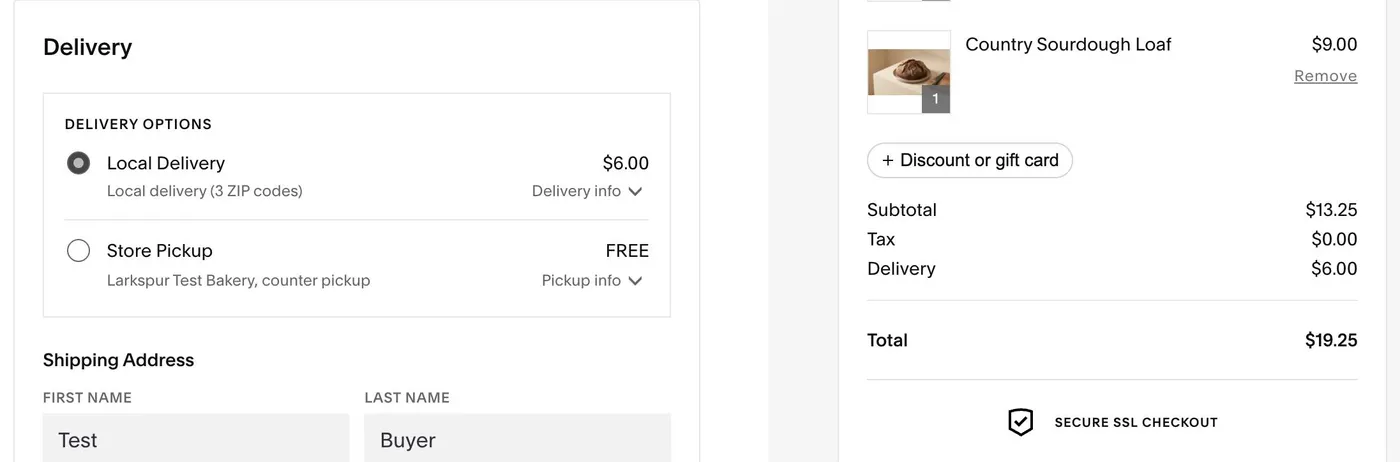
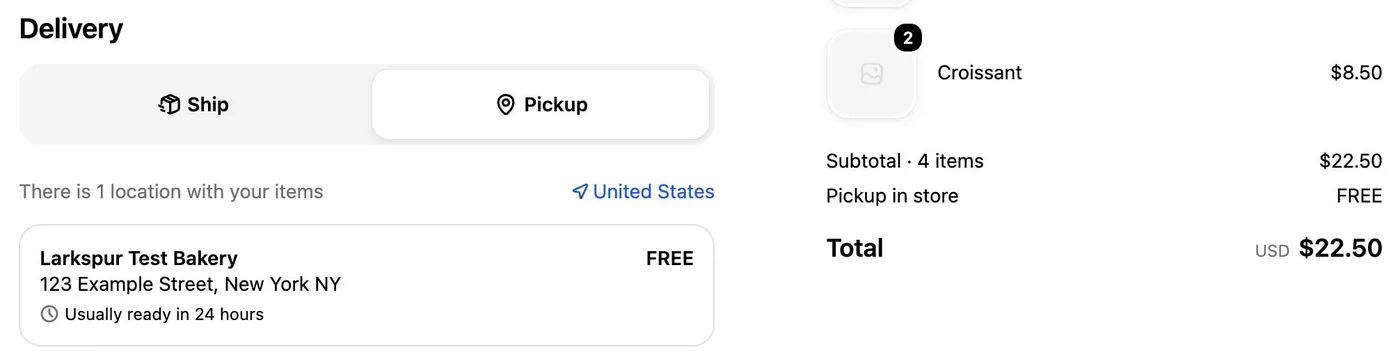
| Pickup at checkout | Free, with your instructions as text | Free, with “usually ready in 24 hours” |
| Customer picks pickup day and time | No | No |
| Daily limit | Not tested | Stock limit works, but on total stock: it doesn’t reset each morning |
| Delivery by ZIP code | Yes, one flat fee | Yes, flat fee or by distance |
| Minimum order for delivery | No. Our $30 minimum couldn’t be enforced; delivery was offered on a $13.25 cart | Yes. Under $30, delivery wasn’t offered |
| “Ready for pickup” email | Yes, one click | Yes, one click |
| Test order before paying | Yes, in test mode once a card processor is connected (Squarespace’s help page; we ran ours after paying) | No, test orders need a paid plan ($1 for the first month when we tested) |
| Cancelling | 4 screens, ends at the end of the billing month, no refund on a monthly plan | 5 screens, store closed, data kept for 2 years |
Tested November 11 and 12, 2026. Details in how we tested this.
What it looked like
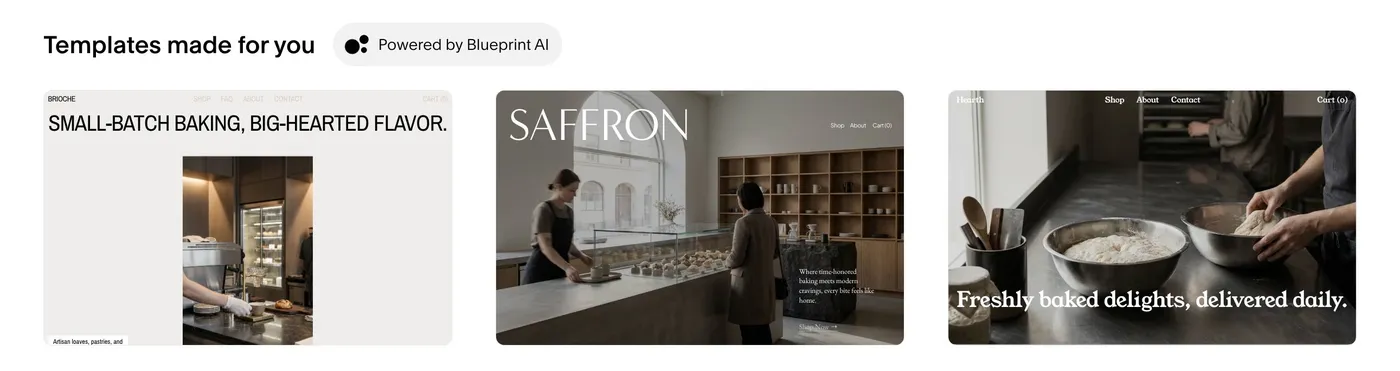
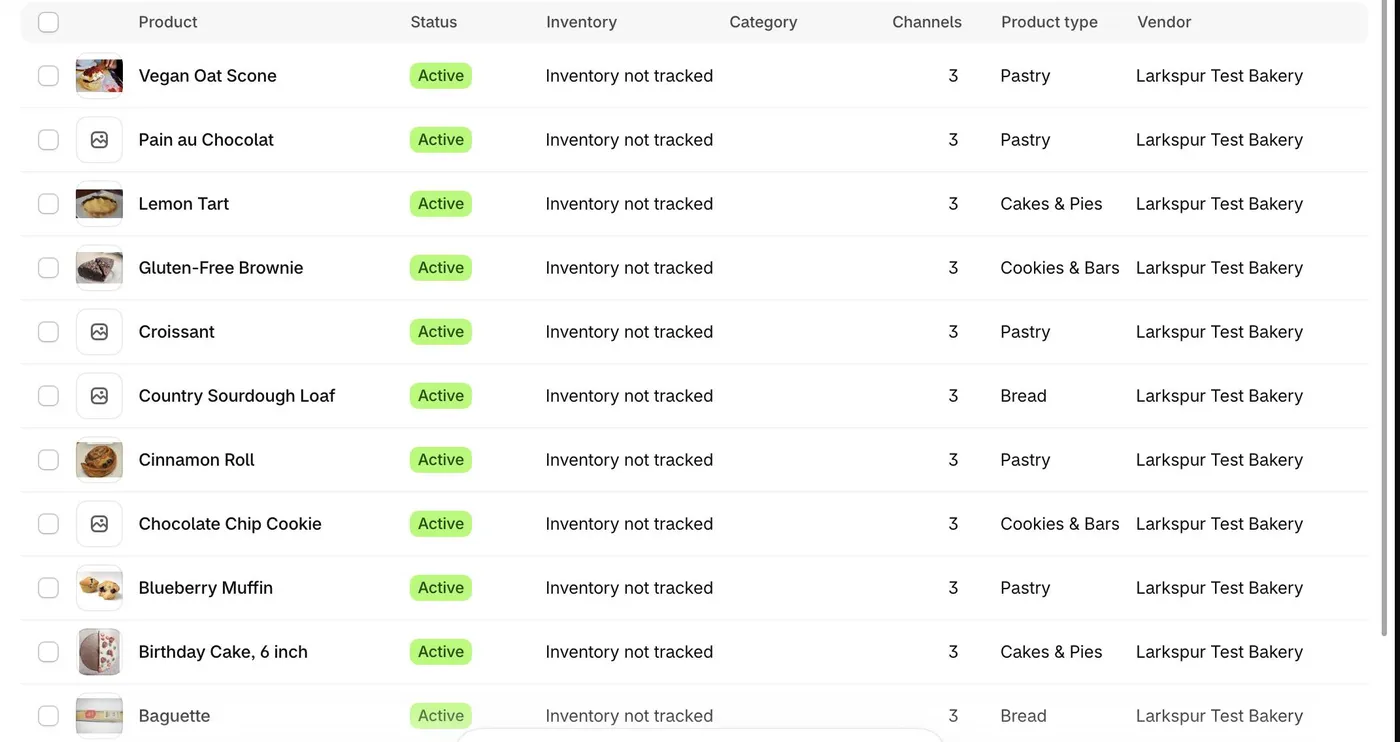
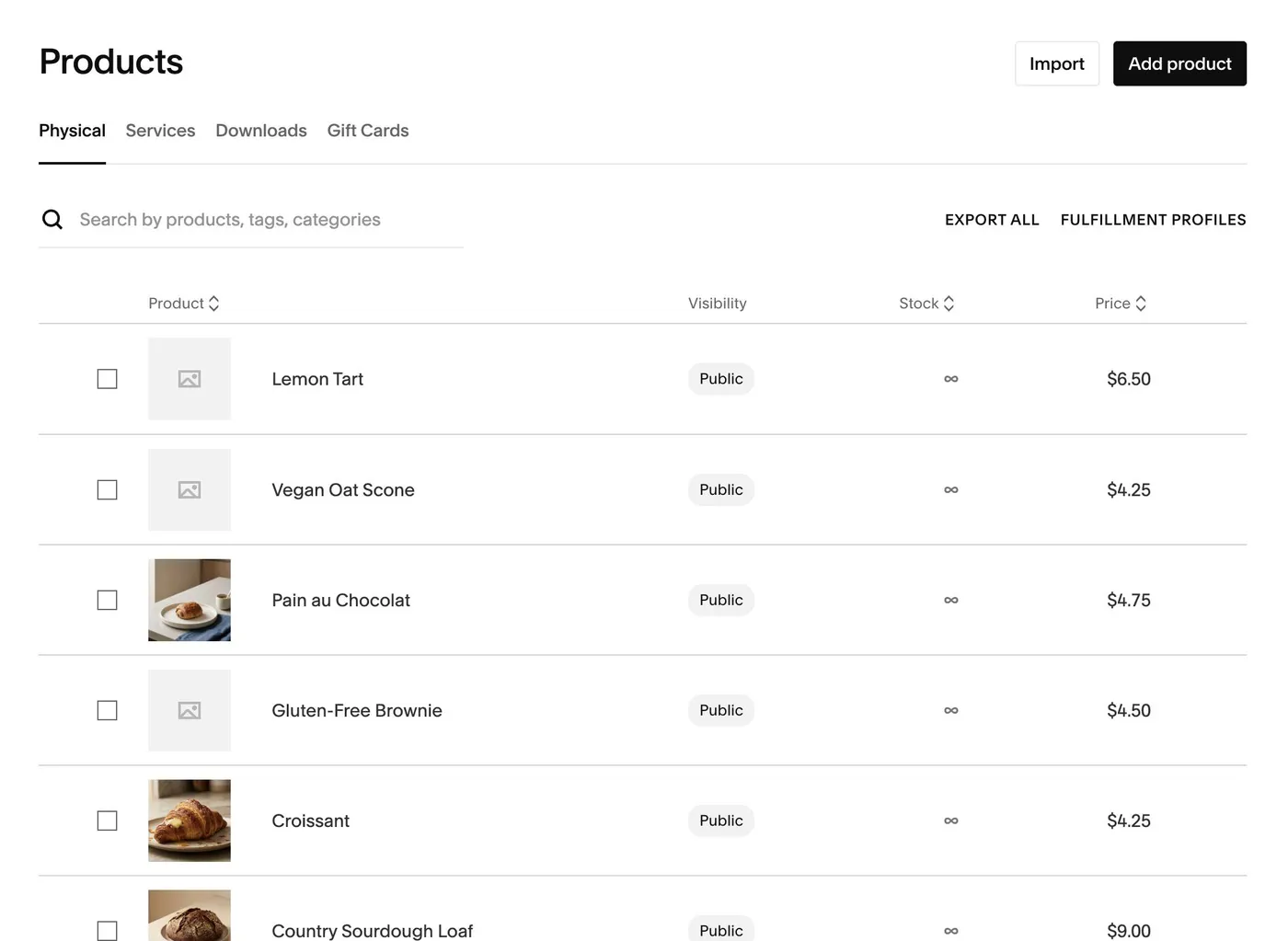
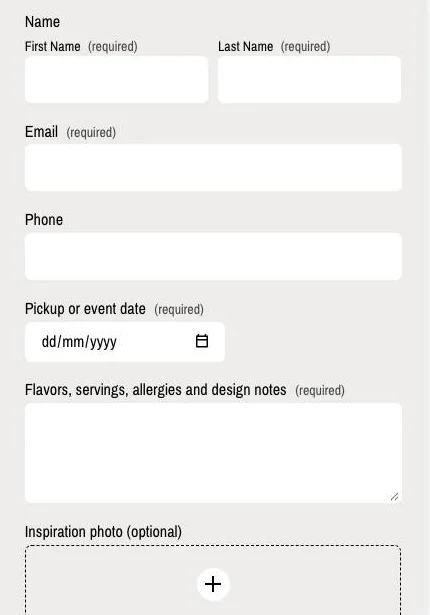

Pickup times: the gap on both
Bakeries live on pickup. On both builders, pickup at checkout means one location and a line of text. The customer can’t choose “Saturday, 9 to 10am”, and nothing stops an order placed after your cutoff. On Shopify the order shows “usually ready in 24 hours”. On Squarespace it shows whatever you type, so “order by 6pm two days before” is a note, not a rule.
To get real pickup slots:
- On Shopify, a pickup and delivery app. Zapiet’s starts at $49.99 a month, and the daily order limits and prep times a bakery needs are listed on its $79.99 plan (listing, checked Nov 12, 2026).
- On Squarespace, there’s no pickup-slot setting. You’d need a separate ordering tool linked from your site. We haven’t tested one.
If you take fewer than a few dozen orders a week, a clear cutoff in your text and a daily check of orders may be all you need. Budget for an app once missed cutoffs start costing you bakes.
What it really costs per month
Prices are US list prices, checked November 8 and 11, 2026. Card processing is extra on every option.
| Squarespace Core | Shopify Basic | |
|---|---|---|
| Plan, billed yearly | $29/mo | $29/mo |
| Plan, month to month | $39/mo | $39/mo |
| Card processing (standard US cards) | 2.9% + 30¢ | 2.9% + 30¢ |
| Cake form with date and photo | Included | A form app (free tiers have monthly submission limits) or an embedded form such as Jotform |
| Pickup time slots | Separate tool | About $50 to $80/mo (app) |
Why Core and not Squarespace Basic: Basic ($19 billed yearly) takes 2% of every sale on top of card fees, and leaves out the announcement bar and the phone info bar. For a bakery selling online, Core is the real starting price. For the full fee math at 10, 100 and 1,000 orders a month, see Shopify vs Squarespace: the real cost of selling.
Traps we hit, so you don’t
Squarespace
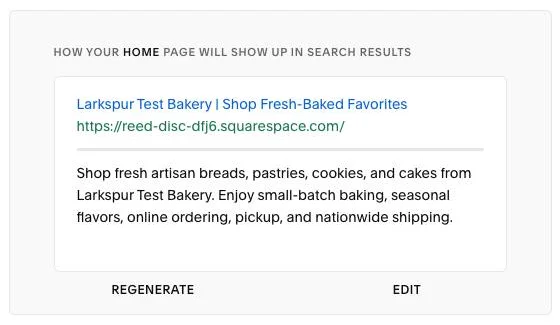
- Check what the AI writes. Squarespace’s AI wrote our search description and claimed “nationwide shipping”, copied from the template’s demo text. We don’t ship. Read it before you publish.
- Form emails are off during the trial. Cake enquiries are stored in Squarespace but don’t reach your inbox until you pay.
- Check your menu import. Ours loaded the items and prices but not the photos or categories, and they were still missing a day later.
Shopify
- Courier shipping is on from day one. New stores come with $8 and $15 shipping rates. Turn them off, or you’ll sell croissants by courier.
- Pickup needs a street address. Pickup didn’t appear at checkout until we added the shop’s address to its location. Setup never asks for it.
- Stock limits don’t reset. Set 40 loaves and the 41st customer is stopped, but tomorrow it’s still sold out until you change the number.
Both
- Sales tax wasn’t collected on either. Both test orders showed $0.00 tax. Shopify lists US tax as “Not collecting” until you turn it on. Set it up for your state before you sell.
How we tested this
One test bakery, the same 24-task checklist on both builders, built November 11 and 12, 2026. A browser assistant did the clicking and a person handled payments and logins, so build times here aren’t what a first-timer would take, and we haven’t timed them. We paid for one month on each, placed test orders with each platform’s test card, marked orders ready for pickup, and cancelled both. We did not take real payments, contact support, or wait for a payout.
Not yet checked: whether Squarespace emails the shop owner for each new order (Shopify does, by default), and how either handles a daily limit that resets every morning.
More on our method: how we test. Who pays us: how we make money.
Related
- Best website builder for a small business: the wider pick, by job.
- Shopify vs Squarespace: the real cost of selling: fees at 10, 100 and 1,000 orders.
- Website builder and hosting renewal prices: what year 2 costs.
- Leaving Squarespace or Wix: if you outgrow your first choice.
Sources and dates
- Plan prices and what each plan includes: Squarespace pricing (US prices checked November 11, 2026; the announcement bar sits on Core and up in its plan comparison) and Shopify pricing (checked November 8, 2026)
- Test orders: Squarespace run test orders and Shopify test orders, both read November 11 and 12, 2026
- Shopify’s built-in contact form: add a contact page, read November 12, 2026
- Squarespace product import: import products, read November 11, 2026
- Pickup slots app: Zapiet Pickup + Delivery, read November 12, 2026
- Home bakery pre-orders: Hotplate pricing, read November 12, 2026
- Everything else on this page: our own build and test orders on November 11 and 12, 2026